01
Plan your time away.
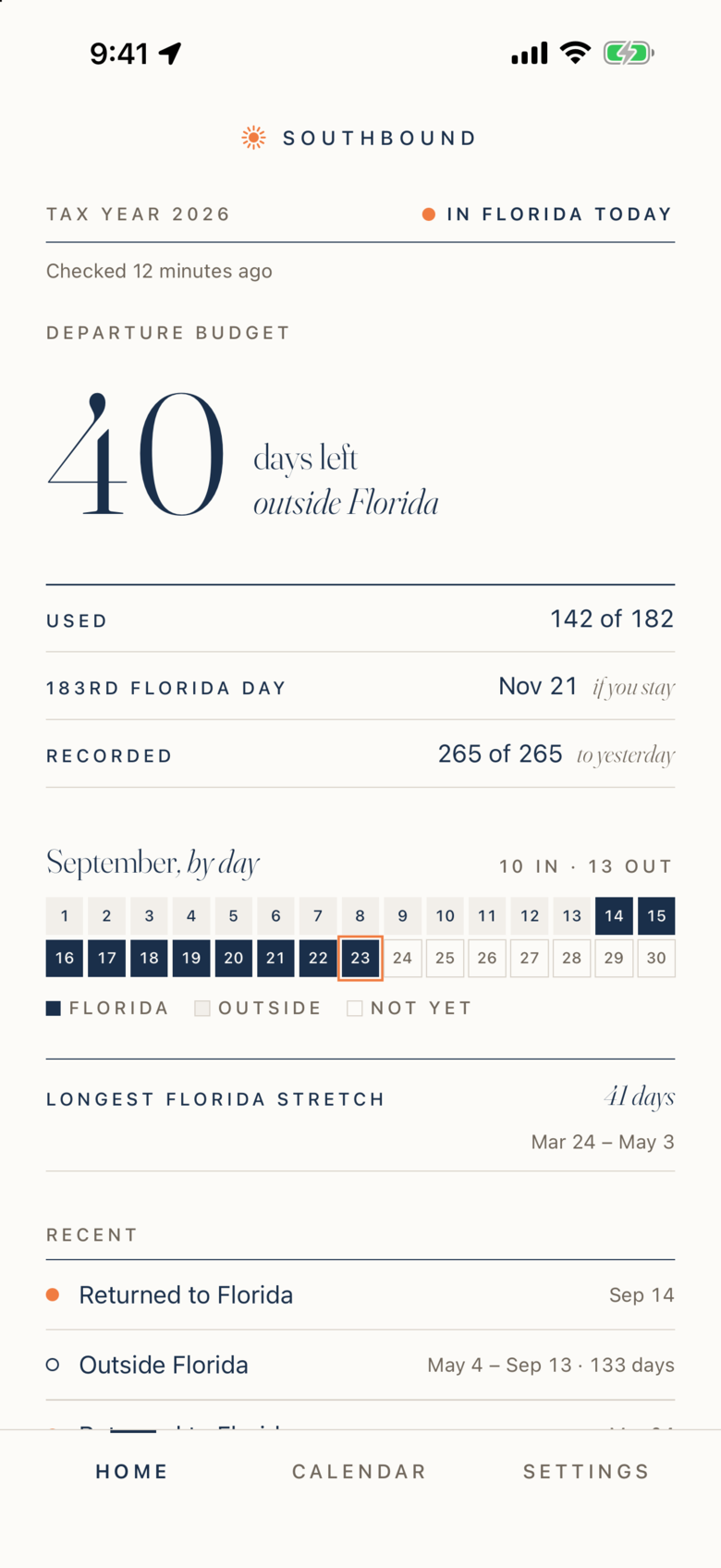
See how many days you can spend outside Florida while staying on track for your chosen annual goal.
For those who split the year
In a residency audit, one of the first questions is where you spent your days. Southbound keeps the answer, day by day, ready for your CPA or estate attorney.
iPhone · US $249.99/year · Eligible users: 14-day trial
What a residency claim can be worth
California
13.3%
12.3% top bracket + 1% over $1M
New York
10.9%
State only. New York City adds up to 3.876%
Florida
0%
No personal income tax
Sources: California FTB, 2025 rate schedules; NY Dept. of Taxation, IT-201 instructions; Florida Constitution, Art. VII, §5. Rates only; what you owe depends on your own facts. Southbound records days, not tax positions.
A minute inside Southbound
01
See how many days you can spend outside Florida while staying on track for your chosen annual goal.
02
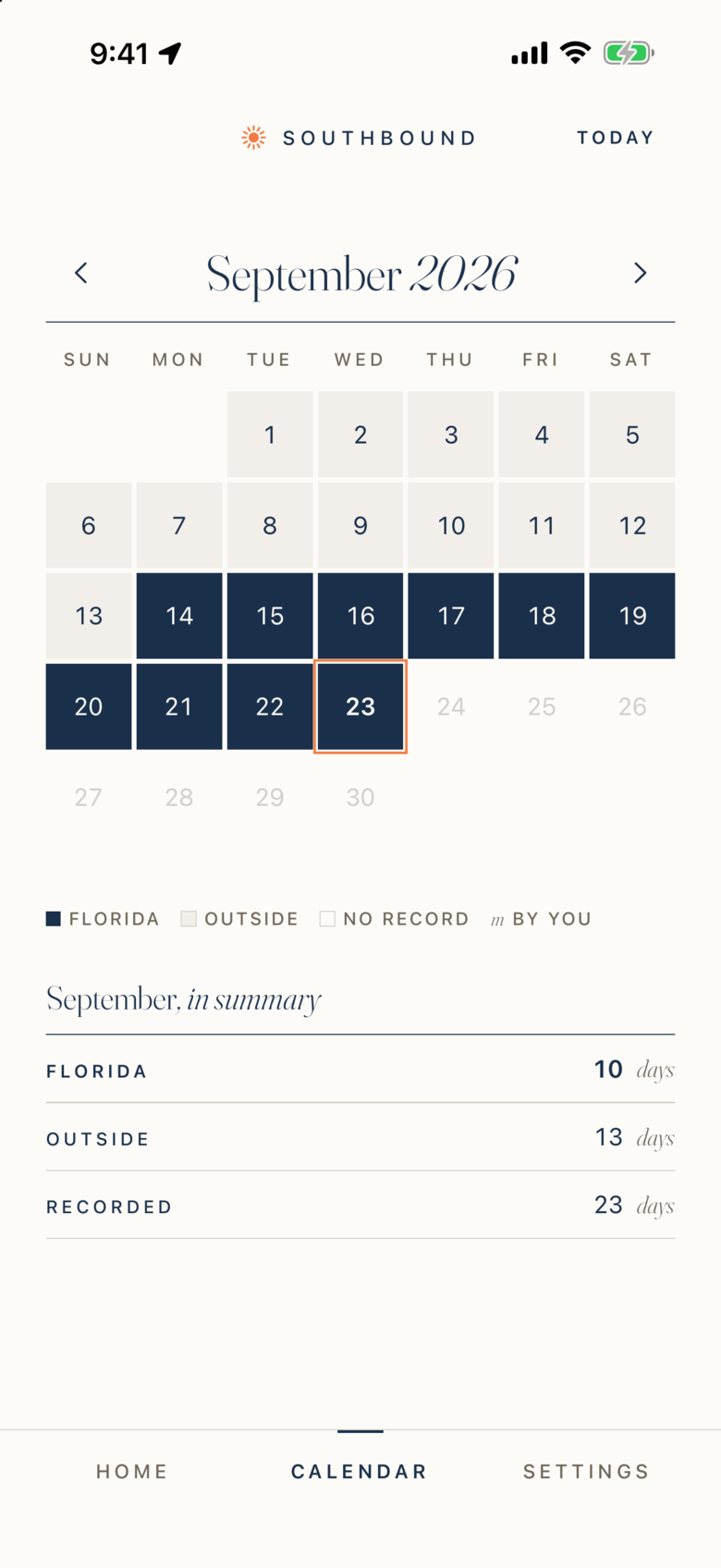
Check your calendar. Correct a day when needed and add a note while the details are still fresh.
03
Export a formatted PDF report or CSV files. Share your day records and supporting detail with your advisor.

Screens show the app. The report comes from the version 2.0 renderer using fictional records.
I · The problem
States with high income taxes, New York and California in particular, have dedicated residency audit units. A residency audit can take years and cost tens of thousands in legal fees, before any tax liability.
A day-by-day record can help your advisor review your travel alongside receipts, calendars, and other supporting documents.
How many days did you spend in each state? The burden of proof is on you.
Where is your home? Where do you vote? Where is your doctor?
Where are your bank accounts, business operations, and club memberships?
New York uses a "near and far" test weighing time, business, family, possessions, and social connections.
II · The product
Your Departure Budget shows how much time you can spend away while meeting your chosen annual day goal. Review it before planning your next trip.
Departure Budget · sample record
| 2026 | Jan | Feb | Mar | Apr | May | Jun | Jul | Aug | Sep | Oct | Nov | Dec | Year |
|---|---|---|---|---|---|---|---|---|---|---|---|---|---|
| Florida | 29 | 25 | 27 | 30 | 3 | 0 | 0 | 0 | 10 | – | – | – | 124 |
| Away | 2 | 3 | 4 | 0 | 28 | 30 | 31 | 31 | 13 | – | – | – | 142 |
| Projected | – | – | – | – | – | – | – | – | 7 | 31 | 30 | 31 | 99 |
I
Your friend invites you to a week in the Hamptons. Open Southbound. One number tells you if you can go.
II
Get a notice when your Departure Budget runs low, while there is still time to change the plan.
III
Export a date-by-date PDF and CSV, with a confidence level and every manual change marked.
How it works · four steps
Grant "Always Allow" during setup. Low-power monitoring, not continuous GPS.
Your phone detects meaningful location changes. Southbound checks the Florida boundary.
Running day count, calendar view, and projection toward 183.
Date-by-date report with confidence levels. Share with your CPA.
III · Who it is for
You split your time between states. Keep a clear record of where you were, then review your residency obligations with your advisor.
You changed your domicile to Florida but still own property or have ties in New York, California, New Jersey, or Connecticut. Those states are aggressive about residency audits.
Winter in Florida, summer elsewhere. Keep both trips in one record and plan against the day goal you choose.
Your CPA told you to keep a log. Southbound replaces the spreadsheet you never update. Export a clean report whenever they ask.
If you advise HNW clients on state tax residency, Southbound is the tool you wish they had. See the advisor page
Residency guides
Understand the move. Keep a record of the days. These guides cover the questions; Southbound helps with the tracking.
Understand the residency questions couples face when their travel plans differ.
Read the guide → 02What the declaration records, where to file it, and how it fits into your move.
Read the guide → 03Explore day counts, domicile, and the questions to discuss with your advisor.
Read the guide →IV · Membership
One annual membership includes every feature. Eligible subscribers can try it free for 14 days.
For new downloads from September 15, 2026
US $249.99/year, billed annually through the App Store. Eligible subscribers receive a 14-day free trial. The subscription renews automatically unless canceled at least 24 hours before the trial or billing period ends. Regional prices appear in the App Store. Original downloads before September 15, 2026 (midnight Eastern) keep every feature free for life.
The checklist
Twelve steps to Florida residency, in order, printable. Declaration of domicile, license, homestead, estate documents: the half you can finish in a month. The day-count half is what the app is for.
2-page PDF · Instant download · A few useful emails after, unsubscribe anytime
Questions
There is no universal 183-day test for Florida residency. Day-count rules and domicile requirements vary by state. Southbound tracks your chosen day goal; it does not determine your tax residency. Ask your advisor which rules apply to you.
Southbound does not use GPS. It monitors cell tower and Wi-Fi network changes — the same low-power system Apple uses for Find My. When your phone detects a meaningful location shift, Southbound checks whether you're inside the Florida state boundary and records the result locally. Most users see zero measurable battery impact.
Your location history stays on your iPhone and your personal iCloud account when sync is enabled. Southbound does not receive that history. Apple and RevenueCat process purchase information. You choose where exported reports go. See our privacy policy for details.
With iCloud sync enabled, successfully synced records can return on a device using the same Apple ID. Records that have not synced may be lost. Check sync before changing devices.
Southbound helps organize your day records for review alongside other evidence. No app can guarantee that a tax authority will accept a report or agree with a residency claim. Work with a qualified tax advisor.
Southbound exports formatted PDF reports and date-by-date CSV files with day status, confidence, and manual changes. Preview the actual 15-page report with fictional records.
Yes, eventually! We plan to bring Southbound to other states with no state income tax, with the same privacy-first approach to day tracking and reports. We are starting with Florida and getting that experience right before expanding. We have not announced the next state or a release date. Have a state in mind? Tell us where you would like Southbound next.
US $249.99/year, billed annually through the App Store. Eligible subscribers receive a 14-day free trial. The subscription renews automatically unless canceled at least 24 hours before the trial or billing period ends. Regional prices appear in the App Store. Original downloads before September 15, 2026 (midnight Eastern) keep every feature free for life.
A note from the person behind Southbound
Already using Southbound? An honest App Store review helps other travelers decide whether it fits their needs. Share what works and what could be better.
Your location history stays private. Please leave travel dates, addresses, and financial details out of your public review.
V · Privacy
Your location history stays on your iPhone and syncs through your personal iCloud account when enabled. Southbound does not receive that history.
You do not create a Southbound account. We do not maintain a server copy of your location history.
Apple and RevenueCat process purchase and subscription information. You choose where exported reports go. Read the privacy policy.