Florida Tax Residency Tracker

The 183-Day Question,
Answered.

Southbound tells you exactly how many days you can still spend outside Florida — and builds a precise, timestamped record for when your CPA asks, or the state does.

How It Works
Free during early access
By invitation only
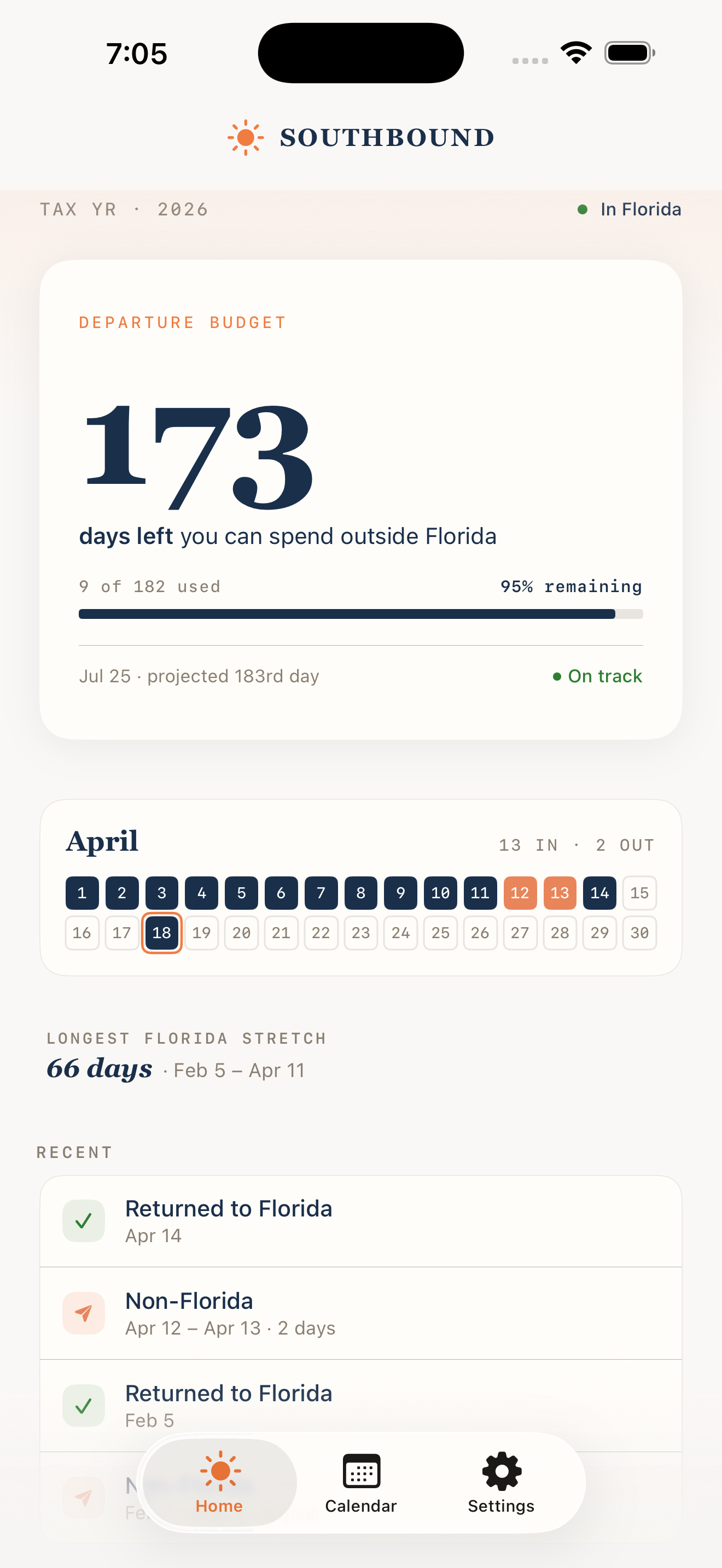
Southbound dashboard showing Florida residency day count and 183-day progress

0

Days required for
FL residency

FL Statute §196.015

$0

NY tax on
$1M income

NY DTF, 2024 rates

0

Net migration
to Florida

U.S. Census, 2020–2023

0

States with income
tax above 5%

Tax Foundation, 2025

Top marginal rates. Source: Tax Foundation, 2025

New: The Florida House voted to eliminate property tax on primary residences starting 2027. (HJR 203, pending voter approval)

Built for People With
Something at Stake

You've made the move — or you're making it. You know the 183-day rule isn't a suggestion. It's the line between Florida residency and a six-figure tax bill from the state you left.

Relocating from a High-Tax State

You've changed your domicile to Florida but still own property or have ties in New York, California, New Jersey, or Connecticut. Those states are aggressive about residency audits. You need documentation that holds up.

Splitting Time Between Two Homes

You spend winter in Florida and summer elsewhere. The exact count matters. One day short and a state auditor has grounds to challenge your residency claim. Southbound tracks every day, automatically.

Working With a Tax Advisor

Your CPA or wealth advisor has told you to keep a log of your Florida days. Southbound replaces the spreadsheet you never update. Export a clean report whenever they ask.

Know Exactly When to Come Home.
The Departure Budget.

Other apps count days in Florida. Southbound tells you the only number that matters: how many more days you can spend outside it.

2026 Departure Budget
134

days you can spend outside Florida

53 of 182 travel days used 73% remaining

"Can I take this trip?"

Your friend invites you to a week in the Hamptons. Open Southbound. One number tells you if you can go.

Smart alerts

Get notified when your departure budget is running low. Never accidentally overstay a trip and lose your residency claim.

Plan with confidence

See exactly how many travel days you have left. No mental math, no spreadsheets, no guessing at year-end.

Set It Up Once.
It Does the Rest.

Designed for people who value their time. Every screen serves a purpose.

Dashboard

Dashboard

Calendar View

Calendar

Settings

Settings

Onboarding

Welcome

Privacy

Privacy First

Location Access

Location Access

Documentation Built
From Your Location Data

Automatic tracking. On-device storage. Audit-ready exports.

Automatic Tracking

Uses iOS significant location changes to detect when you enter or leave Florida. No check-ins, no manual logging. Minimal battery impact.

Departure Budget

One number tells you how many days you can still spend outside Florida. No mental math — just open the app and know.

Audit-Ready Reports

Export a date-by-date CSV report with Florida status and confidence levels for each day. Share directly with your CPA or tax attorney.

Private by Design

No Southbound servers, no user accounts, no analytics. Your data stays on your iPhone and your personal iCloud account. We never see it.

Trip Calendar

View your complete travel history at a glance. See which days you were in Florida and manually override any date that needs correction.

iCloud Backup

Your residency record syncs to your iCloud account automatically. Upgrade your phone, restore from backup — your data follows you.

How It Works

1

Enable Location Access

Grant "Always Allow" during setup. Southbound uses low-power location monitoring, not continuous GPS. Battery impact is minimal.

2

Go About Your Life

When your phone detects a meaningful location change, Southbound checks whether you're inside the Florida state boundary. No check-ins required.

3

Review Your Record

See your running Florida day count, calendar view, and projection toward 183. Manually override any date that needs correction.

4

Export When Needed

Generate a date-by-date report and share it with your CPA or tax attorney. Includes confidence levels based on GPS accuracy.

What Happens When a State
Challenges Your Residency

States with high income taxes — New York and California in particular — have dedicated residency audit units.

Day Counts

How many days did you spend in each state? The burden of proof is on you.

Primary Residence Indicators

Where is your home? Where do you vote? Where is your doctor?

Financial Ties

Where are your bank accounts, business operations, and club memberships?

Near-vs-Far Analysis

New York uses a "near and far" test weighing time, business, family, possessions, and social connections.

A residency audit can take years and cost tens of thousands in legal fees — before any tax liability. The single most important piece of evidence is an accurate, contemporaneous log of where you were, every day. Not reconstructed from credit card statements after the fact. Not a calendar filled in from memory. A record made at the time, automatically.

That's what Southbound provides.

Your Data. Your iCloud.
Our Servers? None.

Southbound has no servers, no user accounts, and no analytics. Your location data is stored on your iPhone and backed up through your personal iCloud account. We never receive, process, or have access to any of it.

Seamless Backup

Your Florida day record syncs to your iCloud account automatically. Lose your phone, get a new one, sign in with your Apple ID — your data is there.

Zero Southbound Servers

We don't operate servers, databases, or cloud infrastructure. There is no "Southbound account" and no data on our end to breach, subpoena, or sell.

Apple-Grade Encryption

iCloud data is encrypted in transit and at rest. Your residency record is protected by Apple's standard iCloud security model — the same infrastructure that guards your photos and health data.

A Tool Worth
Recommending

If you advise clients on state tax residency, you know the conversation. Your client moved to Florida. They're confident they've spent enough time there. But when you ask for documentation, you get a best guess, a partial calendar, or nothing at all.

What the report includes

  • Date-by-date Florida presence record for any calendar year
  • Confidence score based on GPS accuracy for each day
  • Manual override flags, clearly marked as self-reported
  • Total Florida days, non-Florida days, and days with no data

Why it matters

Contemporaneous records carry more weight than reconstructed ones. A log created automatically at the time is stronger evidence than credit card statements assembled after a notice arrives.

Southbound creates that record passively, every day, without requiring your client to remember anything. No data passes through our servers — everything stays on your client's device and their personal iCloud account.

Recommend it to your clients. It costs less than one billable hour.

Simple, Transparent Pricing

Less than one billable hour. Less than 0.2% of what you'll save.

EARLY ACCESS

Annual Plan

$249 /year

That's just $20.75/month

  • Automatic location tracking
  • Real-time progress dashboard
  • Audit-ready CSV reports
  • Trip calendar & history
  • iCloud backup & device transfer
  • No Southbound servers or accounts

Free during early access · by invitation

30-day money-back guarantee

Frequently Asked Questions

What is the 183-day rule?

Most states — including New York, California, New Jersey, and Connecticut — consider you a statutory resident if you spend 183 or more days in the state and maintain a permanent place of abode there. By spending 183+ days in Florida, which has no state income tax, you strengthen your claim to Florida domicile and reduce the risk of being taxed by your former state. The specific rules vary by state. Consult your tax advisor.

How does the tracking work?

Southbound does not use GPS. It monitors cell tower and Wi-Fi network changes — the same low-power system Apple uses for Find My. When your phone detects a meaningful location shift, Southbound checks whether you're inside the Florida state boundary and records the result locally. Most users see zero measurable battery impact.

Is my location data private?

Yes. Southbound has no servers and no user accounts. Your data is stored on your iPhone and backed up through your personal iCloud account — the same Apple infrastructure that protects your photos and health data. We never receive, store, or have access to your location information. When you export a report, it travels through your iPhone's native share sheet — you decide where it goes.

What happens if I lose my phone or get a new one?

Your data is backed up automatically through iCloud. Sign in with your Apple ID on your new device, install Southbound, and your complete residency record will be there. No export/import process, no account to recover — it works the same way your other iPhone data does.

Will this hold up in an audit?

Southbound creates a contemporaneous, automatically-generated record of your presence in Florida — which is the strongest form of day-count evidence in a residency dispute. However, day count is one factor among several that states examine. Southbound is a documentation tool, not legal advice. Work with a qualified tax attorney for audit defense.

What does the report include?

A date-by-date record showing Florida or non-Florida status for each day, along with confidence levels based on GPS accuracy. Days you've manually overridden are clearly flagged. The report can be exported as a CSV file for use by your tax professional.

What does it cost?

$249 per year after launch. The app is currently free during the early access period.

Protect Your Florida
Residency Claim

Install Southbound, grant location access, and let it run. The next time your advisor asks how many days you've been in Florida — or a state auditor does — you'll have the answer.

Learn More

iPhone only. By invitation during early access.